Changes from Version 0.7
NADI GIS
There are new algorithms to deal with larger than RAM datasets. These algorithms work by only loading a subset of the GIS entries at a time while working through the file. They are slower compared to regular algorithms but they can work with larger datasets the regular algorithms can not work with.
User are directed to only use them for larger than RAM datasets.
NADI IDE
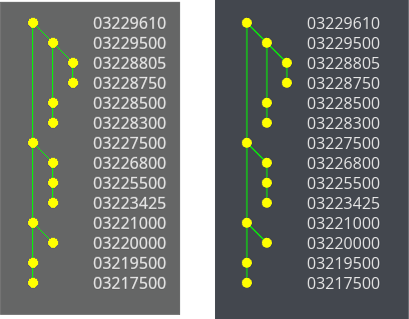
The GUI backend iced has been upgrated to 0.14. This comes with a lot of optimization and improvements from iced.
For example, the network diagram now looks a lot less pixelated while using circular node shapes. It also takes less resources to redraw the diagrams for each frame with better caching.
Screenshot Comparing Network Diagrams after Iced Update
NADI Task System
Most important change: the tasks that run functions in multiple nodes now need nodes or nodesmap keyword instead of node keyword. node keyword now always refers to a single node in a given context. This is to make the keywords consistent with everything else (and English). You need to replace the keywords in your .tasks files.
First, there are many new keywords added to the DSL, some of them are listed below:
| New Keyword | Description |
|---|---|
| try | try statement to contain tasks |
| catch | catch statement when error occurs on try block |
| local | Local; similar to environment but within current locale |
| function/func | user defined functions |
| error | raises an error while evaluating |
| return | early return from a function |
| break | break from a loop |
Many other keywords like, nodesmap, rootsmap, leavesmap, inputsmap, leaves, etc are added as variable types, while the keywords like loop, break, error, try, catch, continue, etc are about control flow.
As some of you probably can guess from the keywords, we now have support for error handling and user defined functions.
Plugin Namespace
Now the plugin functions are on their own namespace. Which means, to be able to use an external plugin, you have to use the dot syntax. For example load_network function from gis plugin is used as gis.load_network. This makes it easy to see which functions are from external plugins, as well as decrease the chances of plugins overwriting functions that were already loaded.
We plan to add an alias system where you can choose to import all functions from a plugin to the global namespace so you don’t have to use the dot syntax.
Expression Context
The DSL now supports expression with context. This is similar to how previously you could use different variable types to get different attributes, function calls, etc. And how you had different task types like node, env, and network. Now all of that is combined with expression context. And it can be nested, giving an endless possible combinations.
Previous tasks that start with keyword and then an expression is now equivalent to an expression context with the same keyword.
For example:
env.x = 1
env {x = 1}
env.x

network.y = 1
network y + 1
network {
	net.y = 1;
    y + 1
}
Results:
1


2

2
But because it is an expression context now, instead of just 3 task type, we can do a lot more:
Here we are assigning incide an expression context, and then reassigning the leaf nodes’ values later
net.load_str("a -> b\n c -> b")
# the block below is equivalent to: nodes<inp>.x = sum(inputs.x) + 1
nodes<inp> do {
   node.x = sum(inputs.x) + 1;
}
leaves.x = 0;
nodesmap.x
Results:
{
  b = 3,
  c = 0,
  a = 0
}
Expression Evaluation
Now normal expressions can be evaluated without the need for env keyword at the beginning.
For example the two lines below are equivalent
env 1 + 2

1 + 2
Results:
3

3
Not only does this mean that users do not have to type redundant env keyword for simple calculations or evaluations to use the REPL as a calculator/debugger. This also means now users can nest expressions within themselves to create more complex expressions.
String Template
We have a new string template system now that is natively implemented inside the NADI system. Which means it is now not as powerful as the last one, but it is fast and more similar to template systems from other languages.
The main changes from the previous string templates in terms of implementation:
- We no longer have to use
_prefix to use strings without the quotes, if the quoted string is needed use functions to quote the string outside of the template. - There are no support for lisp expressions, datetime, and transformation functions in the template. The formatting is done through format expressions. Refer to the new String Template chapter for details.
Furthermore, we have a syntax suger for rendering a template directly.
r"Hi there {name}"
*Error*:
RenderError at Line 1 Column 1: TemplateError at pos 10: Attribute "name" not found
name = "Joe"
r"Hi there {name}"
Results:
"Hi there Joe"
This is equivalent to:
render("Hi there {name}", name="Joe")
Results:
"Hi there Joe"
This allows the user to use template strings even when the function is not asking for a template. This helps the developers focus on writing environment functions taking a single string that can be called from any situation.
That is:
Instead of a exists function that takes a Template, and render it for each node, exists can just take String and user can pass rendered String while calling the function.
network load_str("a -> b")
nm exists("{NAME}.txt")
help node exists
Results:
{
  b = false,
  a = false
}

node exists (path: 'Template', min_lines: 'Option < usize >')
Checks if the given path exists when rendering the template
# Arguments
- `path: Template` Path to check
- `min_lines: Option < usize >` [optional] Minimum number of lines the file should have
In this example, with an environment function exits we could call it with exits(r"{NAME}.txt").
For now we are not removing functions, but in the future we will start focusing more on environment functions that can be called in as many context as possible.
Error Handling
Now the users can choose to catch or raise errors. This is done through adding the syntax to raise an error, and try-catch block that can catch an error inside a code.
The panic is still a problem as it crashes the whole program, we will try to fix any instances of panic that happens inside the code.
For example if a variable is not found
somevar = 10
somevar
env.somevar
Results:
10

<None>
We can catch it,
try {env.somevar} catch { 1 }
Results:
1
This is useful when you want to follow a happy path without a lot of if (env.somevar?) type expressions. Users can now also raise errors, check out the error keyword in the example below inside the user defined functions.
User Defined Functions
Now the users can define environement functions and call it from the tasks.
func fact(val=0) {
  if (val < 0) {error "Negative Value not supported"} else {
    if (val < 2) {1} else { val * fact(val - 1) }
  }
}

fact(9)
Results:
362880
The error handling prevents us from infinite loop in this case.
fact(-8)
*Error*:
UserError at Line 1 Column 1: Negative Value not supported
There is no way to catch specific errors for now. In future versions pattern matching for error handling might be added.
Series/TimeSeries with Gaps
The current version supports series and timeseries data with gaps in them. In the previous version you could only store complete series/timeseries resulting in the plugins having to fill the gap themselves.
Furthermore the series can also be filled with user functions in current version.
The code below shows how to define a series, how to introduce gaps or fill it using series map syntax.
env$x = 1:10

env$x_gap = $x -> func(i) {if (i % 2 == 0) {return i * 10}}
env$x_gap

env$x_filled = $x_gap -> func(i=false) {if (i == false) { 0.0 } else { i }}
env$x_filled
Results:
MaskedSeries(len: 10, dtype: Integers, valid: 5) [-, 20, -, 40, -, 60, -, 80, -, 100]


Series(len: 10, dtype: Floats) [0, 20, 0, 40, 0, 60, 0, 80, 0, 100]
You can also use other series to fill the gaps like:
env$x_filled2 = ($x, $x_gap) -> func(i, j = false) { if (j == false) {i} else {j}}
env$x_filled2
Results:
Series(len: 10, dtype: Integers) [1, 20, 3, 40, 5, 60, 7, 80, 9, 100]
Here we combined two series, but you can do multiple ones. And while you are in a network context, you can also use series from inputs, outputs, etc.