Timeseries Gap Identification
Different from other chapters, the code in this chapters are run in the order they are given, meaning each task code blocks are not independent.
Load the network
network load_file("data/scioto/scioto.network")

network cairo.table("<Name => {NAME}", "output/scioto-net.svg")
Results: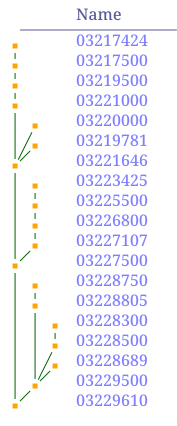
Load timeseries data from CSV, and convert any timeseries without gaps into a complete one.
We can see the number of valid data and number of total data to see that the timeseries have gaps on them.
network csv.load_timeseries("data/scioto/scioto.csv", "date", "streamflow");
# in future version csv.load_timeseries should do this while loading
nodes do ts_complete("streamflow")

nodesmap array(ts_len("streamflow", valid=true), ts_len("streamflow"))
Results:
{
  "03229610" = [7032, 38078],
  "03229500" = [36616, 38078],
  "03228689" = [1119, 38078],
  "03228500" = [31502, 38078],
  "03228300" = [13237, 38078],
  "03228805" = [22495, 38078],
  "03228750" = [11747, 38078],
  "03227500" = [38067, 38078],
  "03227107" = [3639, 38078],
  "03226800" = [21306, 38078],
  "03225500" = [35155, 38078],
  "03223425" = [10319, 38078],
  "03221646" = [3744, 38078],
  "03219781" = [1234, 38078],
  "03220000" = [29678, 38078],
  "03221000" = [37896, 38078],
  "03219500" = [33695, 38078],
  "03217500" = [13604, 38078],
  "03217424" = [1285, 38078]
}
None of the timeseries are complete. We can visualize the gaps using the
nodes.good = (ts_len("streamflow", valid=true) / ts_len("streamflow")) > 0.75
nodes.visual = {};
nodes.visual.nodeshape = "circle";
nodes(good).visual.nodecolor = "darkgreen";
nodes(good).visual.textcolor = "darkgreen";
node[03221646].visual.nodecolor = "red"; # for later
network svg_ts_blocks("output/scioto-ts-gap-id.svg", "{NAME}", "streamflow", 620.0, 820.0, arr_width=500.0, bgcolor="#ffffff33")
Results:

We can use the series map function in NADI to fill the gaps in timeseries using other nodes. The example below shows just two nodes using one to fill the other.
# example to fill timeseries with a value from another node
node[03229610]$sf_fix = ($$streamflow, node[03227500]$$streamflow) -> func(a=false, b=false) {
	if (a == false & b == false) {return}
	if (a == false) { float(b) } else { float(a) }
}

node[03229610]$$streamflow
node[03229610]$sf_fix
Results:
TimeSeries([1920-10-01, 1920-10-02, ..., 2024-12-31], values: MaskedSeries(len: 38078, dtype: Strings, valid: 7032) [-, -, -, -, -, -, -, -, -, -, ...])

MaskedSeries(len: 38078, dtype: Floats, valid: 38067) [110, 110, 110, 110, 110, 110, 110, 110, 110, 110, ...]
We can see the data is filled here, in the beginning the data comes from the node 03227500, while at the end we can see the data comes from the node itself.
node[03229610]$sf_fix[0:100]
nm[03229610,03227500] {$$streamflow[0:100]}

l = node[03229610].sr_len("sf_fix")-1
s = l - 500
node[03229610]$sf_fix[s:l]
nm[03229610,03227500] {$$streamflow[s:l]}
Results:
Series(len: 101, dtype: Floats) [110, 110, 110, 110, 110, 110, 110, 110, 110, 110, ...]

{
  "03229610" = MaskedSeries(len: 101, dtype: Attributes, valid: 0) [-, -, -, -, -, -, -, -, -, -, ...],
  "03227500" = Series(len: 101, dtype: Floats) [110, 110, 110, 110, 110, 110, 110, 110, 110, 110, ...]
}


Series(len: 501, dtype: Floats) [574, 485, 465, 439, 421, 5170, 5360, 5300, 4260, 3620, ...]

{
  "03229610" = Series(len: 501, dtype: Strings) ["574.0", "485.0", "465.0", "439.0", "421.0", "5170.0", "5360.0", "5300.0", "4260.0", "3620.0", ...],
  "03227500" = Series(len: 501, dtype: Floats) [191, 176, 165, 159, 134, 3500, 3690, 4520, 3530, 2970, ...]
}
Now while this was an example where we manually chose which node to use to fill the other. You probably noticed that we can’t simply fill the value in many cases, or you might want to use multiple nodes, or automate it. In that case you can simply use the inputs/outputs/edges or any other keywords in similar manner to use the timeseries from connected nodes, as well as using other attribute values to weight or scale the values.
node[03229610]$sf_fix2 = ($$streamflow, im$$streamflow) -> func(a=false, b=false) {
	if (a == false & b == false) {return}
	if (a == false) {
      if (len(b) == 0) {return}
	  sum([float(i) for i in values(b)])
	} else { float(a) }
}

node[03229610]$sf_fix[1000:1200]
node[03229610]$sf_fix2[1000:1200]

node[03229610]$sf_org = $$streamflow -> func(a="") {
	if (a != "") {float(a)}
}
# need to add the ability to calculate mean of maskedseries

node[03229610] {[sr_mean("sf_org"), sr_mean("sf_fix"), sr_mean("sf_fix2")]}
Results:
Series(len: 201, dtype: Floats) [271, 271, 231, 194, 177, 194, 194, 271, 231, 360, ...]

Series(len: 201, dtype: Floats) [405, 389, 345, 276, 252, 3304, 904, 891, 422, 528, ...]


[2781.179749715586, 1701.8723040954108, 2077.1651452282154]
nodes$$streamflow2 = $$streamflow
node[03229610]$$streamflow2 = $sf_fix2
network svg_ts_blocks("output/scioto-ts-gap-id-2.svg", "{NAME}", "streamflow2", 620.0, 820.0, arr_width=500.0, bgcolor="#ffffff33")
Results:

Now if we do the same with all the nodes with more than one input nodes, we get the following result.
nodes(len(inputs._)>0)$sf_fix3 = ($$streamflow, im$$streamflow) -> func(a=false, b=false) {
	if (a == false & b == false) {return}
	if (a == false) {
      if (len(b) == 0) {return}
	  sum([float(i) for i in values(b)])
	} else { float(a) }
}

nodes$$streamflow3 = $$streamflow

nodes(len(inputs._)>0)$$streamflow3 = $sf_fix3
network svg_ts_blocks("../output/scioto-ts-gap-id-3.svg", "{NAME}", "streamflow3", 620.0, 820.0, arr_width=500.0, bgcolor="#ffffff33")
Results:

If you compare this with the previous image side by side, you can see that now we have timeseries data available for a lot more range. Look at the red node, and the root node, how the timeseries range is now the same as the longest input node.
But it is still limited to when the data is available in the input nodes. We can run another step with output nodes to fill the gaps in the leaf nodes. We can also do that multiple times in a loop to propagate the values based on previous imputation, but of course that decreases the accuracy overall.
Note: This is a simplified algorithm to fill the gaps, you can make it more complicated.