User Defined Functions
User can define functions and use them. Function definition consists of function name, arguments and expression.
func add_one(v) {v + 1}

add_one(12)
Results:
13
The function arguments can be positional or keyword arguments. The keyword arguments are optional on the function call. The keyword arguments are evaluated as expression themselves in a local context, and finally the expression in the function body is evaluated and the result is returned.
For example:
func add_numbers(a, b = 1) { a + b}

add_numbers(1)
add_numbers(1, 2)
Results:
2

3
You can assign variables locally and use them in the final expression that is returned from the function. If you need to prematurely return a value, you can use a return statement. The semicolons at the end of the expressions have no significance inside the function body. The local variables are useful to save temporary results so that they don’t need to be recalculated.
func cakc(val) {
 x = if (val > 10) {return 24} else {val + 2};
 2 * x
}

for x in range(1, 20) {cakc(x)}
Results:
In addition to that, you can also assign the function arguments dynamic values based on previous arguments, or environement/network context. These are similar to the local variables inside the function body, but they can be overridden with other values by the users.
func last(vals, offset=1) { get(vals, len(vals) - offset) }

last(["a", "b", "c", "d", "e"])
last(["a", "b", "c", "d", "e"], 2)
Results:
"e"

"d"
While you can use env, network and nodes variables here as well, the expression is run in immutable context, so nothing can be changed.
The variables are local to the function, hence, any assignment of the variable values inside the body of the functions does not affect the outside.
func test(val=env.somevar) {
	val + 1
}

test(1)

env.somevar = 12;
test()

env.somevar = 10;
test()
Results:
2


13


11
This can allow you to reduce the number of arguments required for the function call while also allowing the user to define that if needed.
Since there is only immutable expression evaluation in the functions, anything requiring something like a loop has to be done through recursion.
func sum_vals(vals, ind=len(vals) - 1) {
	if (ind < 0) { 0 } else {
		get(vals, ind) + sum_vals(vals, ind - 1)
	}
}

sum_vals([1,2,3])
sum_vals([1, 3.5])
sum_vals([1,2,3, 4, 5, 6])
Results:
6

4.5

21
Be careful of exit condition while working with recursion. This could lead into infinite loop. NADI will crash with stack overflow if that happens. This can also happen if there is too much recursion.
Iteration through for loop can be used to generate arrays, but currently there is no syntax for reducing the iteration to single value like required in the sum case. In future, we plan to provide reduce system so that these things can be avoided. This is the first iteration of the user defined functions.
Default Values
Another useful feature of the functions are the default values. You can define a function with default values so that you can only overwrite some of them later.
network load_str("a -> b\n b -> d\n c -> d");

func settings(top=10, bottom=10, left=10, right=10, deltax=10, deltay=10) {
  attrmap(
    top=float(top), left=float(left), right=float(right), bottom=float(bottom),
    deltax=float(deltax), deltay=float(deltay), fontsize=10.0
  )
}

network cairo.table("Index => {INDEX}\n <Name => {NAME}", "./output/svg-funcs.svg")
Results: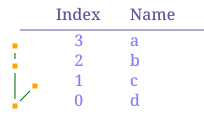
You can save these functions in a file and import them later:
import utils

utils.settings()
utils.settings(top=100)
Results:
{left = 10.0, bottom = 10.0, deltay = 10.0, fontsize = 10.0, right = 10.0, deltax = 10.0, top = 10.0}

{top = 100.0, bottom = 10.0, deltax = 10.0, deltay = 10.0, right = 10.0, fontsize = 10.0, left = 10.0}
While importing functions from a .tasks file, only the function definitions are imported, other tasks are not executed.