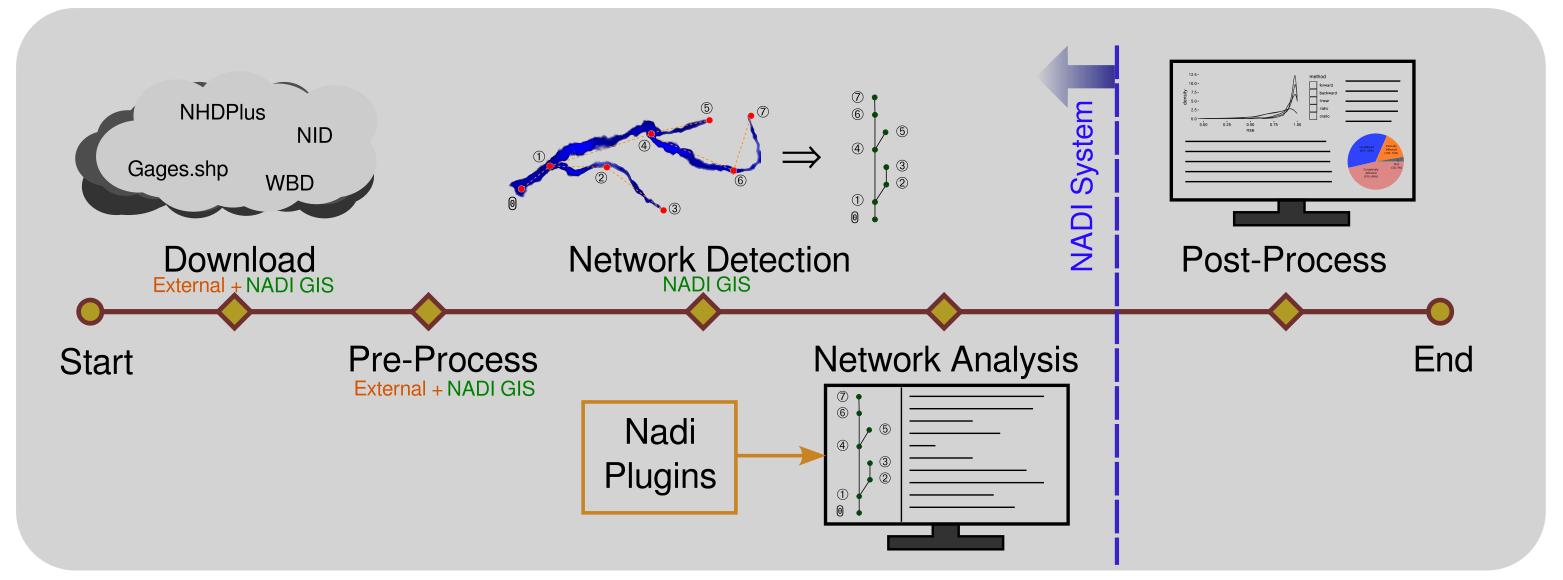
NADI (Network Analysis and Data Integration) system is group of software packages that facilitate network analysis and do data analysis on data related to network/nodes.
The system is made with focus on river network, but is general enough to be applicable to any kind of directed network (Wikipedia: directed graph).
Why use NADI?
NADI DSL is designed with the intension of making network analysis codes easier, for example look at some example codes for NADI vs python for common things:
| Description | Python | NADI |
|---|---|---|
| get a node attribute | node.val | node.val |
| check a node attribute exists | node.val is not None | node.val? |
| sum val for all nodes | sum(n.val for n in net.nodes()) | sum(nodes.val) |
| assign value to all nodes | for n in net.nodes(): n.val = 1 | nodes.val = 1 |
Of course, this are simple examples, but as you learn more about NADI you can see how these and many other patterns in NADI language makes it easier and intuitive to analyze networks. Refer to the book’s Learn by Examples chapter to see specific features of NADI that are related to the programming language.
Most important features of NADI are:
- Language Keywords to support:
- Implicit loop while running functions/expressions in the
nodesvs singlenode, - Implicit array and map (dictionary) for variables, expressions, function calls,
- Easier access to
inputvsoutputnodes as well asrootandleafnodes of the networks for analysis, - and more
- Implicit loop while running functions/expressions in the
- Features that are present in other languages like
if-else,while,for,loop,try-catch,function,import, allowing users to write their own logic, reuse code, and handle errors. - The ability to load functions from shared libraries (
.dll,.so,.dynlib) through the NADI plugin system, allowing advanced users to write functions that are computationally efficient and use them as if they are native to the language itself.
NADI comes with GIS tools, IDE, jupyter notebook, and other tools to make it easier to use it thorough different interfaces.
For more details, refer to the User Manual.