Basic Example
This example has a basic network and a basic tasks for example. It shows how you can load a network, identify node properties, and count nodes based on attributes.Ohio River and Tributaries (Flow Routing)
This example contains a network that consists of the lock and dams in the mainstem Ohio River, and some of its major tributaries. The example explores how to load attributes, and calculate different attributes like basin area ratios to estimate flows at different nodes based on other nodes. A simple streamflow routing example with dummy data is provided. This network was used in the following paper to estimate the naturalized flows at different points of the Ohio River, the paper preceeds the NADI software.Atreya, G., E. Emery, N. Rogacki, M. Buck, R. Soltanian, D. McAvoy, and P. Ray. 2024. “Estimating the influence of water control infrastructure on natural low flow in complex reservoir systems: A case study of the Ohio River.” Journal of Hydrology: Regional Studies, 54: 101897. https://doi.org/10.1016/j.ejrh.2024.101897.
Ohio River USGS Gage Analsis
This example contains a network of USGS gages and NID dams in the Ohio River basin, the code analyses the gages that are affected and not affected by any dams upstream based on their network and year constructed. This example is a modified version from the analysis that was done for the following paper:Atreya, G., T. Steissberg, D. McAvoy, X. Chen, and P. Ray. 2026. “Towards an improved language for river data analysis: Demonstration for the highly-regulated Ohio River basin.” Environmental Modelling & Software, 106866. https://doi.org/10.1016/j.envsoft.2026.106866.
NADI System Git Graph
This example is a non-river network example. The network consists of the git commits from the NADI System codebase. It shows how you can apply NADI to a non river network case, query for different parameters. There was no real research questions about the git network, so the example is just a simple demo showing how you can detect merges and branching off.Colorado River Network
This example has a network consisting of 3 thousands nodes from the following paper:Mukhopadhyay, S., A. Sankarasubramanian, and C. Awasthi. 2020. “Developing the hydrological dependency structure between streamgage and reservoir networks.” Scientific Data, 7 (1): 319. Nature Publishing Group. https://doi.org/10.1038/s41597-020-00660-6.
The tasks code is simple and only shows the nodes that have multiple output nodes.Colorado River Network (Visualization)
This example uses the same network as the colorado example above but only focuses on making a circular layout from scratch. This example shows how to write your own layout algorithm for network visualization.USGS Streamgage Network
This example uses a network of nodes in the GAGES-II dataset. The network was detected using nadi-gis utility using the NHDPlus streamlines. The overall network is pretty huge and might be slow to run in your computer. Use it as an example of NADI's capabilities in dealing with large networks. This example shows you how you can look and validate networks using basin area attribute. But all the attributes in the Gages-II dataset is included with the network for you to play around with.
Output
Search for functions and their help, multiple results will load as clickable buttons.
Help
NADI System has two main components, this playground only deals with the network analysis part using the NADI DSL (Domain Specific Language). The DSL is also called the task system.
In this playground you can load network through the Network tab, and you can work with the DSL through the NADI DSL tab. You can also load networks from the DSL using the corresponding network functions.
The playground provides you with an online editor for NADI DSL with autocompletion, syntax highlighting and code execution. Although it is not exact 1:1 match with the desktop application, the online version of NADI is a powerful tool in itself that can help you with your network analysis problems.
The playground contains multiple tabs, in the left are the tabs related to network information, network/node attributes, edge attributes and NADI DSL code. On the right are the network view and examples tab.
Network and Attributes
NADI network consists of nodes and their connections with each other. The connection is shown using the-> symbol with one node before and one after showing a directed edge. You can group multiple nodes together within braces {} in newer versions of NADI.
Attributes in NADI can be loaded in different ways. NADI Playground uses the TOML format for both Node and Edge attributes. The Attributes tab can be used to load network attributes as key=val pairs, and node attributes as key=val pairs inside a group named after the name. Similarly, the Edge Attributes tab contains the edge attributes with nested format where the attributes are grouped under [FROM.TO] group where FROM is the starting node and TO is end ending node of the edge. Load some examples from the Examples tab to see them in effect.
NADI DSL Editor
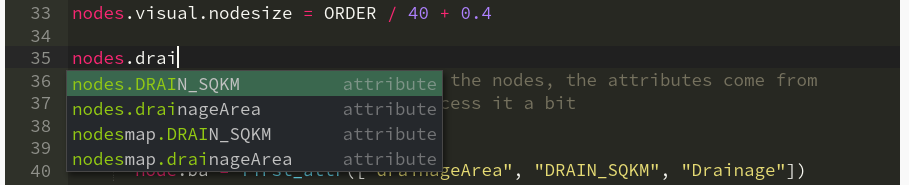
NADI DSL tab is the main point of entry for any analysis, it comes with syntax highlighting, autocomplete, tooltips etc. The autocomplete shows you the attributes or functions related to the current context. It is not perfect, so I am erroring on the side of caution by showing things that might not exist or vice versa.
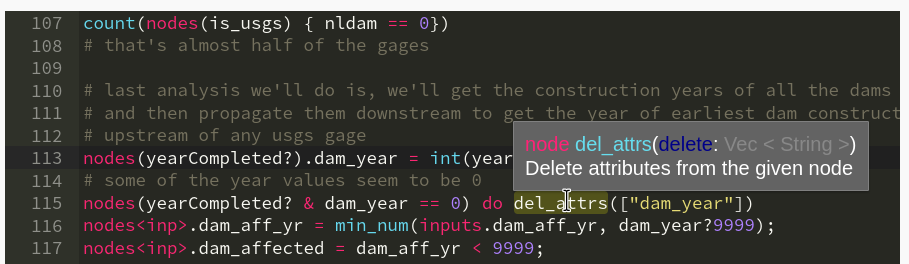
 Similarly, the tooltip helps you understand what a function does and what arguments it does. Ideally the tooltip should appear when you are typing the function arguments, but I'm figuring out how to do that :).
Running code and Network View
You can run NADI DSL code multiple ways, you can use Ctrl+Enter on network or attributes tab to load network and attributes. And you can use Ctrl+Enter on NADI DSL tab to run the selected lines (or current line if nothing is selected). Or you can use the buttons on the top of Network View tab on the right.
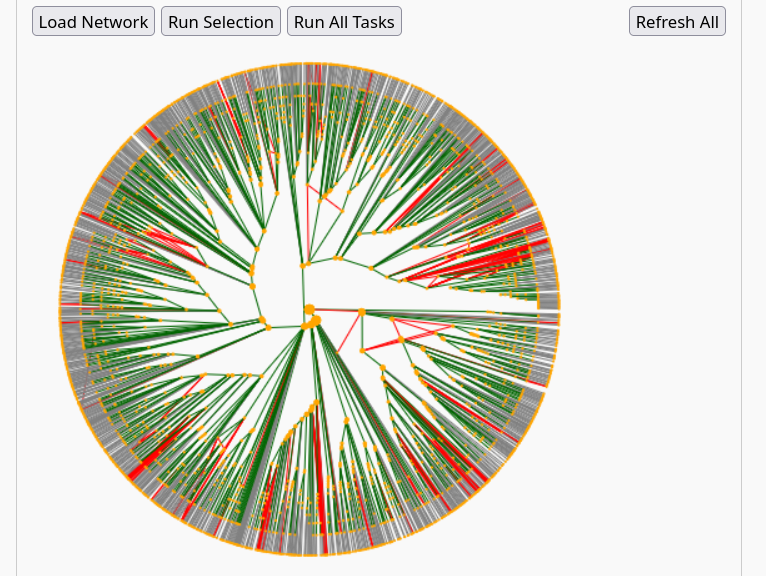 The Network View tab contains the following buttons:
- Load Network: loads the network and attributes
- Run Selection: Runs the selected code, or current line in NADI DSL editor
- Run All Tasks: Runs all the code in the NADI DSL editor
- Refresh All: Reloads the network, attributes and runs all tasks
Further Reading
You can learn about why NADI System might be useful to your use case in Why NADI? page of the NADI Book. Most important features of NADI are:
- Language Keywords to support:
- Implicit loop while running functions/expressions in the
nodesvs singlenode, - Implicit array and map (dictionary) for variables, expressions, function calls,
- Easier access to
inputvsoutputnodes as well asrootandleafnodes of the networks for analysis, - and more
- Implicit loop while running functions/expressions in the
- Features that are present in other languages like
if-else,while,for,loop,try-catch,function,import, allowing users to write their own logic, reuse code, and handle errors. - [Only for Desktop Application] The ability to load functions from shared libraries (
.dll,.so,.dynlib) through the NADI plugin system, allowing advanced users to write functions that are computationally efficient and use them as if they are native to the language itself.
For more details on the DSL and the system as a whole, refer to the NADI Book located here: https://nadi-system.github.io/latest/. Refer to the book’s Learn by Examples chapter to see specific features of NADI that are related to the programming language.
Quick Start: To load a network and attributes from Network and Attribute tabs click "Load Network". To run the DSL use the two Run button, to run everything use "Refresh All" button. For more help refer to the Help tab. Examples tab has example network analysis with networks and example code you can load.