Network Function
Network function runs on the network as a whole. It takes arguments and keyword arguments. Few network functions we have been using throughout the examples are load_file, load_str and cairo.table:
network load_file("./data/mississippi.net")
network command("mkdir -p output")
nodes.title = str_replace(NAME, "-", " ");

network cairo.table(
   "Index => {INDEX}\n<Name => {NAME}\n",
   "./output/network-mississippi-sdf.svg"
)
Results: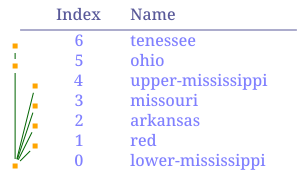
The examples below use the graphviz plugin to generate the graphviz file, and later graphviz program to visualize it. Make sure you have the plugin loaded in NADI and graphviz installed in your system if you want to replicate the results. Refer to the plugins section to learn how to load the plugins in to the NADI System.
For example following network function takes file path as input to save the network in graphviz format:
save_gv(
	outfile [PathBuf],
	name [String] = "network",
	global_attrs [String] = "",
	node_attr [Option < Template >],
	edge_attr [Option < Template >]
)
Note that, if the arguments have default values, or are optional, then you do not need to provide them.
For example, you can simply call the above function like this.
network load_file("./data/mississippi.net")
network save_gv("./output/test.gv")
network clip()
# the path link are relative to /src
network echo("./output/test.gv")
Results:
digraph network {

"red" -> "lower-mississippi"
"arkansas" -> "lower-mississippi"
"missouri" -> "lower-mississippi"
"upper-mississippi" -> "lower-mississippi"
"ohio" -> "lower-mississippi"
"tenessee" -> "ohio"
}
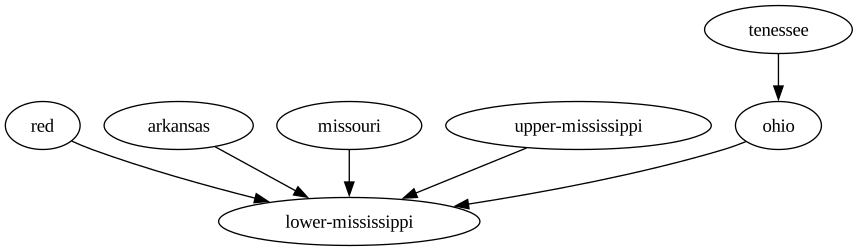
With extra commands you can also convert it into an image
network load_file("./data/mississippi.net")
network save_gv("./output/test.gv")
network command("dot -Tsvg ./output/test.gv -o ./output/test.svg")
network clip()
# the link path needs to be relative to this file
network echo("../output/test.svg")
Results: