Node Function
Node function runs on each node. It takes arguments and keyword arguments.
For example following node function takes multiple attribute names and prints them. The signature of the node function is print_attrs(*args).
network load_file("./data/mississippi.net")
nodes print_attrs("INDEX", name=false)
Results:
INDEX = 0
INDEX = 1
INDEX = 2
INDEX = 3
INDEX = 4
INDEX = 5
INDEX = 6

[<None>, <None>, <None>, <None>, <None>, <None>, <None>]
Only the INDEX is printed here. But node that the return value of nodes is an array, and as the print_attrs function does not return a value, it lists a values of <None>. When you want to do things for each node, but not return a value, you can either silence the return through ;, or use a do keyword to idicate it’s a task not a return value.
network load_file("./data/mississippi.net")
nodes print_attrs("INDEX", name=false);

nodes do print_attrs("NAME", name=false)
Results:
INDEX = 0
INDEX = 1
INDEX = 2
INDEX = 3
INDEX = 4
INDEX = 5
INDEX = 6


NAME = "lower-mississippi"
NAME = "red"
NAME = "arkansas"
NAME = "missouri"
NAME = "upper-mississippi"
NAME = "ohio"
NAME = "tenessee"
The keywords nodes and nodesmap always return an array or a map, if not silenced or used with the do keyword.
Node Function Propagation
Propagation of the node functions refer to the order and selection of nodes to run the function on.
As we have seen above, when you run node functions, you can run it for all the nodes. If you want to run it for one node, or a selective nodes, you need to select them using propagation.
For single node, the way of selecting the node is similar to propagation, i.e. use node keyword with node name inside []:
network.load_str("a -> b");
node[a].NAME
node[b] {[NAME, ORDER]}
Results:
"a"

["b", 2]
But this does not allow more than one node, and returns a value instead of a list, or a map that nodes or nodesmap keywords do.
For multiple nodes, for example, you might want to:
- run the function only on nodes that satisfy a condition,
- run the funciton only on a group of nodes,
Or you might want to change the order of the node function execution. Like running input nodes before the output node, if your function/analysis needs that.
These things are done with 3 syntax in the node function:
Order
You can run functions in different orders:
sequential/seq=> based on node indexinverse/inv=> inverse based on node indexinputsfirst/inp=> input nodes before outputoutputfirst/out=> output node before inputs
network load_str("a -> b\n b ->d \n c -> d \n d -> e")
nodesmap<seq> array(INDEX, ORDER)
nodes<inv> array(INDEX, ORDER)
Results:
{
  e = [0, 4],
  d = [1, 3],
  c = [2, 1],
  b = [3, 2],
  a = [4, 1]
}

[[4, 1], [3, 2], [2, 1], [1, 3], [0, 4]]
Currently, inp and inv are equivalent, while seq and out are also equivalent. But when the parallization is added in the future versions, they will be implemented differently. So for backward compatibility, if you function needs to be run in a certain way, always use that one.
Here an example showing how to calculate the order of the node.
network load_str("a -> b\n b ->d \n c -> d \n d -> e")
nodes<inp>.val = sum(inputs.val) + 1;
nm [val, ORDER]
Results:
{
  e = [5, 4],
  d = [4, 3],
  c = [1, 1],
  b = [2, 2],
  a = [1, 1]
}
If you do not use the inputsfirst propagation here, you get an error because the val attribute doesn’t exist in inputs, and if you did have that variable already, it would be old data instead of the recent results from your expression.
network load_str("a -> b\n b ->d \n c -> d \n d -> e")
nodes.val = sum(inputs.val) + 1;
nm [val, ORDER]
*Error*:
EmptyValueError [e] at Line 2 Column 1: the expression resulted in empty value
Here the [e] after the Error shows which node the error is from. If we look at the values, we can see that all values are empty, and the expressions errors out on the first node e, because the input d doesn’t have val.
nm [val, inputs.NAME]
Results:
{
  e = [<None>, ["d"]],
  d = [<None>, ["b", "c"]],
  c = [<None>, []],
  b = [<None>, ["a"]],
  a = [<None>, []]
}
If we ran it for node a for example then we wouldn’t get an error.
node[a].val = sum(inputs.val) + 1;
nm [val, ORDER]
Results:
{
  e = [<None>, 4],
  d = [<None>, 3],
  c = [<None>, 1],
  b = [<None>, 2],
  a = [1, 1]
}
NOTE: I need to work on better error messaging. It is in TODO list for the next major release.
Node List/Path
You can selectively run only a few nodes based on a list, or a path.
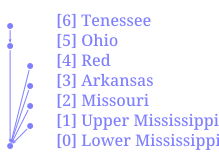
Given this network:
List of Nodes
List of node contains a separated list of node names or quoted string if the name is not valid identifier/number inside [].
network load_file("./data/mississippi.net")
nodes[tenessee,"lower-mississippi"] do print_attrs("NAME")
Results:
NAME = "tenessee"
NAME = "lower-mississippi"
Path of Nodes
Path of node has the same syntax as a path used in the network file. It has starting node and end node. Instead of it representing a single edge like in network file, it represents all the nodes that are between those two (inclusive) if the network is a rooted tree graph. If any nodes in between the nodes have multiple outputs, then the path doesn’t work. This limitation will be fixed in the future.
network load_file("./data/mississippi.net")
nodes[tenessee -> "lower-mississippi"] do print_attrs("NAME")
Results:
NAME = "tenessee"
NAME = "ohio"
NAME = "lower-mississippi"
As we can see in the diagram, the path from tenessee to lower mississippi includes the ohio node.
Logical Condition
Logical condition is used by putting an expression that evaluates to a boolean value inside the ().
network load_file("./data/mississippi.net")
nodes("mississippi" in NAME) do print_attrs("NAME")
Results:
NAME = "lower-mississippi"
NAME = "upper-mississippi"
Combination
You can combine the three different types of propagations in a single task using the syntax node<...>[...](...), they must come in that sequence as the order is decided first, then the list/path is taken, and finally the condition is evaluated to boolean before selecting the nodes.
For example:
network load_file("./data/mississippi.net")
nodesmap[tenessee -> "lower-mississippi"]("mississippi" in NAME) INDEX
nm<inv>[tenessee -> "lower-mississippi"] INDEX
nm<inv>[tenessee -> "lower-mississippi"](ORDER > 1) INDEX
Results:
{
  "lower-mississippi" = 0
}

{
  "lower-mississippi" = 0,
  ohio = 5,
  tenessee = 6
}

{
  "lower-mississippi" = 0,
  ohio = 5
}